
Drag-and-drop Page Builder
Build your homepage, Space pages, and CMS pages from responsive, column-based layouts and a widget library — news feeds, people directories, quick links, recognition. Rearrange a page in minutes, not sprints.
Page Builder
Every vendor says "customizable." Axero's Page Builder is specific: drag-and-drop layouts your comms team rearranges in minutes, and full CSS and JavaScript access underneath when you want to go further. Not one or the other.
Trusted by












The problem
Most intranet platforms force a choice. Take the out-of-the-box template — fast to launch, but it looks like the vendor and works like nobody's org chart. Or commission a from-scratch build — it fits on day one, then every homepage tweak waits in a developer queue. Both paths end the same way: a homepage the company stops recognizing as its own, and changes that take a sprint instead of an afternoon.
Core capabilities
Your team can build it with drag-and-drop for speed, code for deeper control, and nobody waiting on an Axero ticket to make it real.
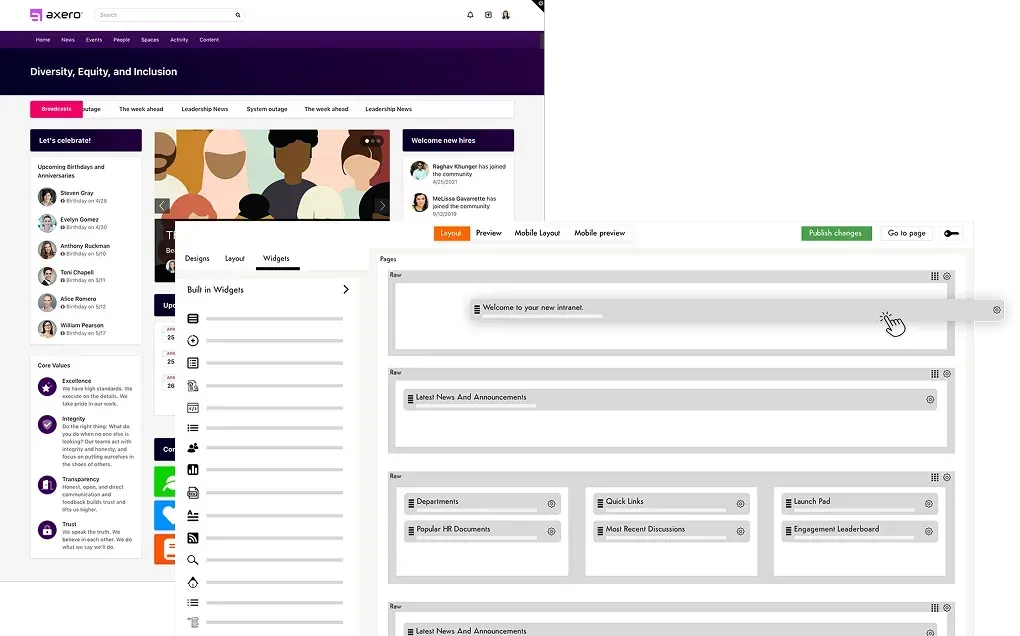
Build your homepage, Space pages, and CMS pages from responsive, column-based layouts and a widget library — news feeds, people directories, quick links, recognition. Rearrange a page in minutes, not sprints.
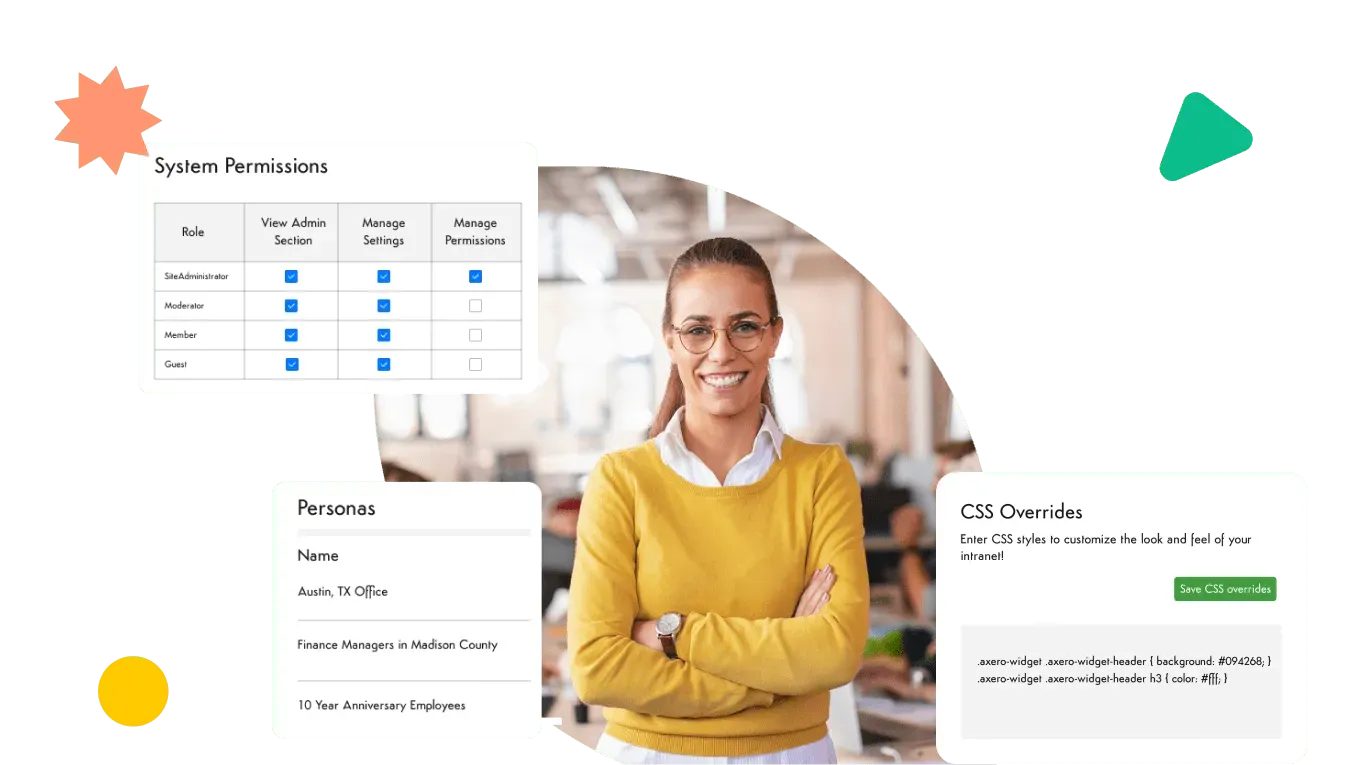
Drag-and-drop isn't a ceiling. Teams that want to go further get full CSS and JavaScript overrides on the same pages — pixel-level control without leaving the platform.
Fonts, colors, headers, navigation — match a complex brand guide, not just drop a logo in the corner. The intranet reads as yours, because it is.
Show different groups different experiences: a frontline homepage for field teams, a dashboard for managers. Personas target layouts and content by role, department, or location — customization per audience, not just access control.
Ship the intranet as your own app in the app stores — your name, your icon, your splash screen. Employees install your brand, not ours.
Language options localize the experience for global workforces, so a custom intranet doesn't stop at headquarters.
What teams build
See what's possible: six page types built from the same widgets in the toolkit above. A homepage, a department hub, an HR portal — each one is rows and widgets your team can assemble and rearrange just as easily.
News and announcements, an events list, quick links to the tools people open daily, and a search box. The news feed is a Content List widget pointed at your announcements; quick links are a Navigation widget. Comms owns the page and reorders it without a ticket.
One page per team: department announcements, the policies and files that team owns, a team directory pulled from real profiles, upcoming events, and a quick poll. Each department manages its own hub inside its own space, so IT isn't the bottleneck for a copy change.
Benefits, payroll, and time-off entry points grouped as Navigation widgets, with a Content List of the current policy documents and another for HR announcements. Employees stop emailing HR to ask where the handbook lives.
A first-week checklist, the documents and training a new starter needs, their team shown from the people directory, orientation sessions from the events calendar, and who to contact for help. Role targeting means new hires see it and everyone else doesn't.
Widgets can be shown only to a specific role — or only on a manager's own profile and those of their direct reports — so one page serves as a manager view: outstanding approvals, team announcements, and a recognition roll-up for their own team rather than the whole company.
A dedicated home for internal communications: a featured leadership post, secondary stories underneath, and commenting on so announcements are a conversation. The same content can appear here and on the homepage through a shared widget, edited once.
These six only scratch the surface. Browse intranet examples for the fuller range.
Governance
The reason page building usually stays locked to IT is that letting more people in risks the brand and the permission model. Axero separates those concerns, so you can hand out page editing without handing out everything.
Page Builder access is permission-based, and view, create, update, and delete are separate grants. Crucially, they can be granted at site level or scoped to a single space — so a department lead can build and edit pages inside their own space and nowhere else. Note there's no separate approval step before a page goes live: whoever can edit a page can publish it, so scope the grant to match the trust.
Site-wide CSS overrides, branding settings, and theme-file editing sit behind their own dedicated permission, separate from and higher than page editing — a page editor doesn't get them by default. Worth knowing when you delegate: page-level scripts and raw-HTML widgets do come with page-edit rights, so grant page editing to people you'd trust with that.
Page edits are kept as history, and you can view any previous version and roll a page back to it. That's the practical safety net that makes delegation reasonable — a bad edit to the homepage is an undo, not an incident.
The global header is built once and only a site administrator can activate it. Master template pages push a single layout onto the pages that inherit from them. The display templates that control how widgets look are managed at site level, so a space editor picks from approved styles rather than inventing new ones. And shared widgets let you edit a block once and have it update everywhere it appears.
Mapping this against a specific approval process or compliance requirement? Bring it to a demo and we'll show you exactly which permission does what.
Page Builder covers what your team builds itself. For custom internal tools — project trackers, HR portals, dashboards — Axero App Manager pairs an AI build engine with Axero's own engineers to build the tool for you, directly on your intranet. Nothing for your team to learn or maintain, and it inherits the intranet's permissions and branding. Comparing it against no-code platforms? Here's how it stacks up.
Compatibility
A custom layout is only half the job — the pages also have to show live information from the tools your company already runs. Widgets and integrations put that data on the pages you build.
Microsoft 365, Google Workspace, Slack
Surface calendars, files, and feeds from the tools your teams already use, on the pages you lay out.
500+ REST APIs
Pull data and content from systems Axero doesn't connect to natively, and build it into any page. See the full list on the integrations page.
Launchpad and quick links
Put every third-party tool one click away from any page, so the custom homepage is also the front door to the rest of the stack.

The platform underneath the pages — communication, knowledge, and culture in one place.
Learn moreThe retrieval layer that makes everything you build findable.
Learn moreHow Axero structures and governs the content your custom pages surface.
Learn moreReal homepages, department hubs, and portals — customization in practice.
Learn moreRecognized by the industry





Bring your brand guide to a demo and we'll show you how close Page Builder gets out of the box — and what CSS access covers from there.