
Results bury the answer in noise
The document exists, but it's result #40 — behind near-duplicates, stale drafts, and pages that happen to share a keyword. After two bad tries, people stop trusting the box.
Search
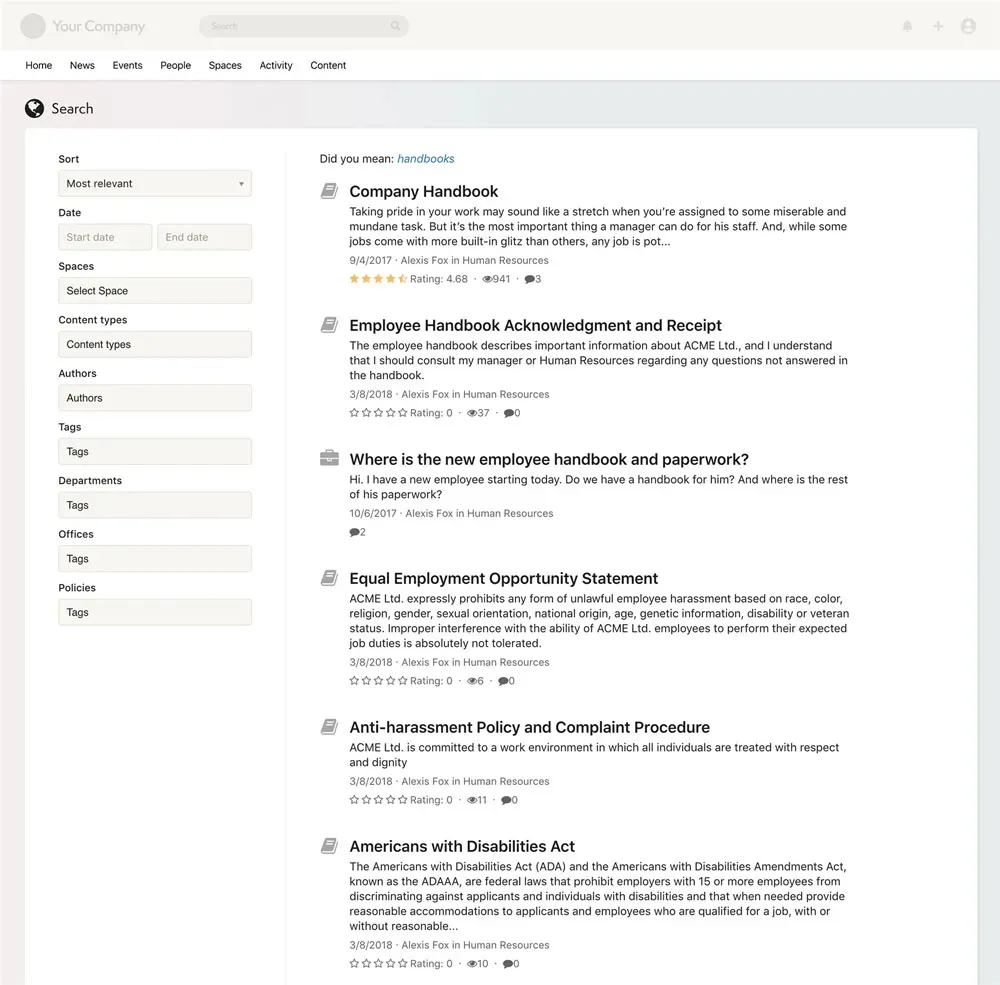
Axero's intranet search is full-text, permission-aware, and federated — it reads inside documents, respects who's allowed to see what, and reaches into connected repositories like SharePoint. One search box for everything.
Trusted by












Nobody files a ticket that says "search is bad." It shows up as interruptions, duplicated work, and decisions made on the wrong version of a document.
The document exists, but it's result #40 — behind near-duplicates, stale drafts, and pages that happen to share a keyword. After two bad tries, people stop trusting the box.
When search fails, employees interrupt whoever answered last time. Your subject-matter experts become the search engine, and the same question gets answered by hand every week.
The policy is in SharePoint, the spec on a shared drive, the decision in a chat thread. When there's no single place to look, every search is really five searches.
Search surfaces documents people were never meant to see — or hides ones they need because access was bolted on after indexing. Either failure kills trust in the results.
The answer is one sentence on page 12 of a PDF. A search engine that only indexes titles and tags will never surface it, no matter how carefully anyone names their files.
Axero's intranet search is a full-text, permission-aware search engine built into the intranet. It indexes Spaces, wikis, articles, files, discussions, and people — plus connected repositories like SharePoint — and reads the text inside documents, not just titles and metadata.
Because search is part of the platform rather than a bolted-on module, there's nothing separate to sync or administer: the same permission model that governs every Space and document governs every search result.
Search also runs scoped inside each team's workspace — every space has its own Search app covering just that group's content.
Core capabilities
Not a keyword matcher with a text box in front of it — a retrieval layer that makes everything else in Axero findable.
Search reads inside PDFs and Office documents, so a phrase buried deep in a file surfaces even when nobody titled or tagged it well.
One query covers Axero plus connected sources — SharePoint, OneDrive, and network drives. Employees find and open a SharePoint document from Axero's search bar without knowing where it lives.
Results are filtered against Space and document permissions automatically, so employees only see what they're already authorized to open. There's no separate search ACL to maintain alongside your content permissions.
Narrow by content type, Space, author, or date — "the onboarding doc HR published this quarter" is three filters, not thirty results.
Sometimes the answer is a colleague, not a document. Search surfaces people by name, title, and department alongside content, so "who owns payroll?" gets an answer too.
Each space has its own scoped search covering just that group's articles, files, and discussions — with control over what gets indexed.
Axero Copilot
Axero Copilot answers plain-language questions from the same content search indexes, inside the same permission model — an employee can't get an answer drawn from a document they couldn't open. For the full breakdown, see Axero Copilot on the knowledge base page.
Tuning and administration
Most intranet search is a black box: it returns what it returns and your only recourse is renaming files. These are the levers an administrator genuinely has.
Pin specific content to the top for the queries that matter. Attach terms to a page — "pto", "vacation", "time off" — and it surfaces first, flagged as promoted, whenever someone searches them. There's an admin dashboard listing everything currently promoted, filterable by space and content type, so it's a maintainable list rather than a one-off trick.
Maintain your own synonym list so internal vocabulary resolves to the same results: "PTO" and "time off", "expenses" and "reimbursement", a product codename and its real name. It ships pre-seeded with "HR / human resources" and "IT / information technology". There's also a character dictionary so terms like "C#" and "AT&T" are genuinely searchable instead of being stripped as punctuation.
Beyond keyword matching, ranking can factor in how recently content was updated and how much it's actually viewed — with the recency decay and the weighting of each signal configurable. Turned on, a policy revised last month outranks the 2019 version that happens to share a title. It's off by default, so it's a deliberate choice you make with us during setup rather than an invisible thumb on the scale.
See what employees search for, how often, and whether they clicked anything — including which result position they clicked. That last part is the useful signal: a high-volume term with no clicks means the answer isn't there or isn't recognizable, which is a content problem you can fix. Reports export to CSV, and space managers get the same view scoped to their own space.
Administrators control which file formats are indexed for their full text — the default list covers PDF, Word, Excel, PowerPoint, OpenDocument, Apple Pages, Numbers and Keynote, and native Google Docs, Sheets, and Slides — and whether the contents of connected external files are indexed too. The index rebuilds on demand, in full or for a single content type, with live progress.
When a query looks misspelled, search offers a "did you mean" correction the user can click. Worth being precise about: it's a suggested alternative from a dictionary, not automatic typo correction, so it helps with ordinary misspellings rather than with mistyped internal product names. Stemming, stopwords, and partial and wildcard matching all run on every query.
Have a specific relevance problem — a query that should return one obvious answer and doesn't? Bring it to a demo. It's the fastest way to see whether these levers cover your case.
Compatibility
Axero doesn't ask you to migrate everything before search gets useful. Connect the repositories your content already lives in, and they show up in the same permission-aware results as native content.
SharePoint and OneDrive
Search and retrieve SharePoint documents from Axero's search bar — existing libraries stay where they are and still show up in results.
Microsoft Teams and Slack
Launch into Axero from the chat tools your teams already have open, so search sits one click from where the questions get asked.
Network drives
Connect legacy file shares so old-but-current content is findable without a migration project on day one.
500+ REST APIs
Pull in content from systems Axero doesn't connect to natively. See the full list on the integrations page.

Search is one piece of a broader knowledge management strategy — the pillar page covers the rest.
Learn moreHow Axero structures, governs, and maintains the content search retrieves.
Learn moreThe organizing unit search indexes — every team's content, people, and conversations in one place.
Learn moreWhere each platform fits — and why teams put Axero's search in front of their SharePoint libraries.
Learn moreRecognized by the industry





Bring the queries your employees actually type — we'll show you what comes back, including results from a connected SharePoint library.