
Implementation Guide
How to Build and Launch an Intranet
Ready to stand up your intranet? Here's how to plan it, own security and governance from day one, and roll it out step by step — starting with a quick word on build vs. buy.
Get the free PDF version to read later.This is the execution guide: once you've decided to move forward with an intranet, here's how to plan it, get security and governance right, and roll it out so people actually use it. We've worked with hundreds of organizations of all sizes to launch intranet software, and the rollouts that go smoothly share the same handful of decisions made early. The plan below is what we've seen work.
A quick note on how to use it: put a small project team on this rather than one person. If you're a smaller company without a team to spare, these tasks still scale down fine. Read it start to finish, or jump straight to the step you're stuck on.
First, what is a company intranet?
A company intranet is a private, secure network that a single organization uses to communicate, collaborate, and share information among its employees. It runs on standard internet technology but is accessible only to authorized members, and the data inside it stays behind your access controls rather than on the open web. A modern intranet pulls news, documents, people, conversations, and the tools your team already uses into one place they can actually find things in.
Before the tasks, settle build vs. buy.
One question shapes everything after it: do you build a custom intranet in-house — a SharePoint site knitted together with custom pages, or a homegrown portal — or buy and configure a purpose-built platform? Building can be the right call when your requirements are genuinely unique and you have an engineering team you can commit to it for years; for most organizations, buying wins on total cost, security, and time-to-launch. This page assumes you're configuring a platform, but the planning, content, governance, and rollout steps below are the same work either way.
For the full comparison — cost over time, IT maintenance burden, security and compliance ownership, feature velocity, and time-to-launch — see Should I Buy or Build Intranet Software?
Want numbers behind the decision?
The intranet buyer's guide walks the evaluation, and the ROI calculator estimates the return for your team size.
Task 1: Identify your purpose, your "why".
Since you're reading this, you probably have some idea of the challenges you want to solve with a company intranet. If you don't know your why yet, this step is worth your time. Most organizations can put their "why" into these categories.
- To improve internal communication – Get news, announcements, and project updates to everyone, and let people comment, share ideas, and communicate in real time instead of over email.
- To manage organizational knowledge / content – Capture the knowledge in your organization in a knowledge base and make it easy to find and use — internally for employees, and sometimes externally for customers or partners.
- To engage people in an online community – Connect the people inside (employees) or outside (customers, partners) your organization so they can communicate and share information in one place.
- To improve productivity & collaboration – Give teams a place to work together, share files, and get things done on projects with the latest information.
Most customers combine these into one unified platform and call it different names — employee portal, Enterprise Social Network, Social Intranet, Customer Support Community, Collaboration Hub, Online Workspaces. The key word is internal: an intranet is where your people create content, communicate, collaborate, automate processes, train, and build culture.
Factor in how your people actually work. If your organization is hybrid or fully distributed, your "why" isn't only about sharing information — it's about giving remote and frontline employees the same access to news, documents, and each other that in-office staff have always had. Ask concretely: Can a deskless employee find a policy from their phone? Can a new remote hire meet their team without a hallway to bump into them in? Does an announcement reach a night shift the same way it reaches headquarters? Name that requirement now so it shapes the tasks that follow — especially your homepage and your mobile experience.
Task 2: Identify your content inventory.
Your intranet should be the primary source for organizational information, so populate it with your most up-to-date content. The most common content types are:
- Company policy & procedures
- Past and new news articles and announcements
- Frequently asked questions
- Photos of employee activities (volunteering, corporate events, picnics)
- Promotional or training videos
Then think about how your organization already categorizes this information — usually by department. HR handles policy documents, benefits materials, and the handbook; Communications handles newsletters and announcements. You can group most content into a department, project team, or logical category. Don't overthink it.
Task 3: Choose your functionality.
Axero includes a wide range of standard functionality out of the box — you decide which features to use, and that's what makes your intranet yours. The most common features for managing the content above:
- Company policy documents – Upload them to the File Manager for download, or paste the content into an Article or Wiki and link to it.
- News & company announcements – The Articles or Blogs features suit ongoing updates: newest at the top, easy to publish, and searchable.
- Events – Company meetings, deadlines, webinars, and training days go on a clean calendar view where people can be invited and set their own reminders.
Plan for how people will find all of this, not just where it lives. Decide up front whether search is a plain keyword box or something smarter. Axero includes an intranet search that spans pages, files, wikis, people, and integrated tools, plus an AI Copilot that answers a question in plain language — "what's our PTO carryover policy?" — and cites the intranet content it pulled the answer from. That matters most for the two groups least likely to go digging: new hires who don't know where anything is yet, and frontline or remote staff who won't browse a folder tree on a phone. Treat AI-powered knowledge search as a core feature to turn on, not an afterthought.
Decide which integrations earn their place. Connecting other systems makes sense when it removes a step people take every day — syncing accounts from your directory via Active Directory / SSO, or surfacing files from the storage tool your team already lives in. The test for any integration is simple: does it add value to what your people need to get done, or is it just a novelty? Wire up the ones that clear that bar and skip the rest.
Task 4: Define your spaces or groups.
A Space is a place where you group people, content, and conversations — organized in a way that's familiar to how you already work, so people can easily find what they need. Browsing a few real intranet examples is a good way to see how other teams structure theirs. Axero has two types:
- Public Spaces – Everyone can see them, join them, and view the content inside.
- Private Spaces – Hidden. Nobody knows these exist unless you invite them.
Begin by creating a space for each department — Human Resources, Communications, IT — then build out a hierarchy of spaces inside spaces as you see fit. For example:
HR Department
- Policies & Documents – company policy documents, FAQs, & the handbook.
- HR News – the latest HR news & announcements.
- Benefits – PDFs or documents about benefits and health insurance plans.
- Calendar – open enrollment deadlines, training sessions, and HR meetings.
IT Department
- IT Policies & Guides – technology policy documents, how-to's, & guidelines.
- IT Help Desk – where employees submit IT issues and you track progress.
- IT Documents – best practices, whitepapers, or software documentation.
- IT Calendar – meetings, scheduled network updates, and training sessions.
Communications Department
- Company News – company-wide news, announcements, updates, and press releases.
- Ideas – an online suggestion box where people surface new ideas.
- Files – PDFs and Word documents, accessible to everyone.
- CEO Blog – a place for leadership to share industry and company insights.
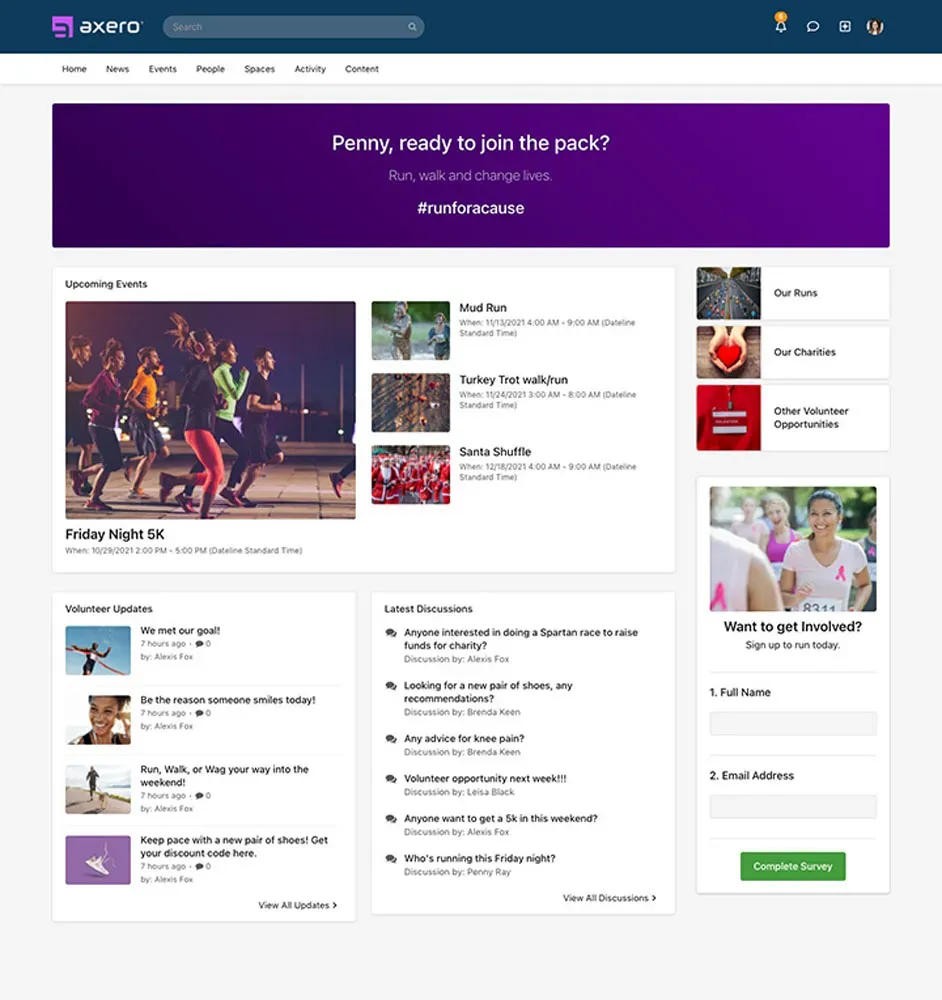
Once your spaces are defined, decide which features to turn on or off for each — you already mapped content to features in Task 3.
Task 5: Populate Axero with your content.
With your inventory built, your content mapped to features, and your spaces decided, it's time to start adding content. Ideally, a team of people owns their section of the intranet: HR manages and populates its space, Communications manages its space, IT manages its space, and so on. Giving people access to the information they need to do their jobs is how you achieve your "why."
Task 6: Tailor the look and feel to your brand and your people.
Axero is flexible with the look and feel of your site. For non-technical people, it offers a default template for your homepage and other pages — no code required. Create a design that matches your corporate style without being so "busy" that it distracts from finding information. A great place to start: upload your logo, choose your header color, then explore the rest of the customization settings.
Task 7: Your homepage.
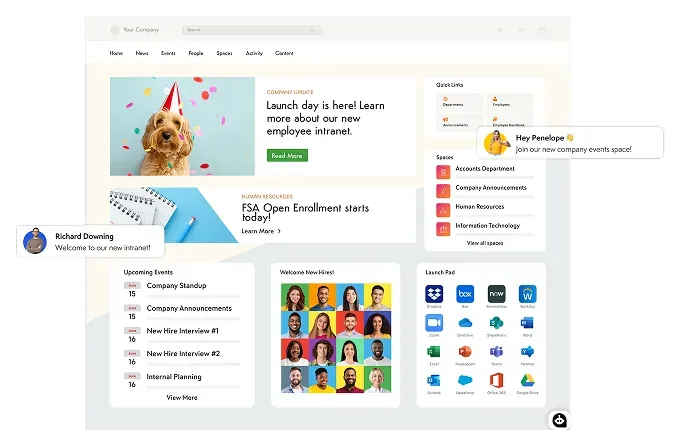
First impressions matter. Your homepage says who you are as an organization and sets the tone — treat it with the same care you'd give a customer-facing home page. It's the aggregator: use it to provide direct access to the information your people need and what you want them to see. Common homepage widgets and sections:
- Corporate news / announcements
- Employee directory / people search
- Most viewed and highest rated content
- Featured articles and featured spaces
- Photo carousel
- Quick access to start a support ticket (IT, HR, etc.)
- CEO or president's blog
- An activity stream, so people see what colleagues are watching, using, and consuming
- A prominent search bar with the AI Copilot, so people can ask a question instead of hunting for a link
- A "For You" panel that surfaces what's relevant to a person's role, team, or location
Design the homepage for the person on their phone, not just the person at a desk. If any of your workforce is hybrid, remote, or frontline, the homepage is the one screen they'll all see — so make the things they need reachable in a tap: today's announcements, the search / AI Copilot, their tasks, and a shortcut to whatever tool they open most. For a deskless employee, asking a question is far more realistic than navigating your space hierarchy. Keep it dynamic, so people see fresh information every time they visit and always have a reason to come back.
Task 8: Add users, then get permissions, governance, and security right.
So far you've documented your "why," mapped it to features, and populated the site with content. Now you add people — and for anyone in IT, this is the task that actually matters. Permissions aren't only about keeping users out of areas they don't belong; they keep the experience clean (nobody should feel buried in content that isn't theirs) and keep the whole intranet defensible when a security or compliance review comes around. Get this layer right and the rest of the platform is safe to open up.
Access control: decide who sees what, by design
Think about access in layers rather than user-by-user. A few models to combine:
- Role-based access – Grant permissions to roles (employee, manager, HR admin, space moderator) instead of individuals, so access follows the org chart and new hires inherit the right defaults automatically.
- Space-level permissions – Each Space controls its own membership and visibility. Public Spaces are open to everyone; Private Spaces are invisible unless you're invited — ideal for HR, Legal, Finance, or leadership content.
- Content-level control – Within a Space, you can still restrict individual documents or pages, so a sensitive policy draft stays limited even in an otherwise open department.
The goal is least privilege by default: people get exactly the access their role needs, and you widen it deliberately rather than locking things down after something leaks.
What IT should own vs. what to delegate
The most common intranet-governance mistake is IT trying to own all the content, which turns them into a publishing bottleneck. Draw the line clearly:
- IT owns the guardrails – authentication and single sign-on, the role and permission model, integrations, security configuration, audit logging, and the overall information architecture.
- Departments own their content – HR publishes and maintains HR content, Comms owns news, IT owns the help desk. Delegate a Space moderator in each department so publishing doesn't route through a ticket queue.
This is exactly the split a good platform is built for, and it sits at the heart of solid intranet governance: IT delegates content ownership by department without giving up control of permissions. Define these owners before launch and write them down — governance that lives only in one admin's head doesn't survive that admin changing roles.
Security and compliance considerations
Whether you built the intranet or bought it, someone will eventually ask how it's secured. Have answers ready for:
- Single sign-on (SSO) – Connect the intranet to your identity provider so access follows your existing corporate credentials and MFA. Axero supports SAML-based SSO with providers like Okta, Azure AD / Microsoft Entra, and Google.
- Automated provisioning (SCIM) – Sync accounts from your directory so joiners get access on day one and, just as importantly, leavers are deprovisioned automatically. Axero ships a SCIM 2.0 provisioning API for exactly this.
- Audit trails – Keep a record of who accessed and changed what, so you can answer an auditor or investigate an incident.
- Regulatory fit – Map the intranet to what you answer to, and keep two categories separate. SOC 2 reports and ISO 27001 certification belong to the vendor: ask for them and reference them in your own review, which saves real work. GDPR and HIPAA are legal obligations rather than certificates anyone issues you — how you meet them depends on your data, configuration, contracts, and processes. See Axero's security and compliance details.
- Hosting model – Decide between cloud and self-hosted based on your data-residency and control requirements. Axero offers a self-hosted option when data has to stay inside your own environment.
Some of this can mature after launch, but a subset genuinely can't. Authentication, the permission model, data classification, and whoever is accountable for security need to be production-ready on day one — those are the ones that are painful and expensive to retrofit once real people and real content are in the system. Turning on SSO and SCIM early, in particular, saves you from re-onboarding everyone later. Refinements like extra audit reporting, deeper retention rules, or a formal review cadence can follow.
Then: pilot, launch, and improve
The eight tasks above get you an intranet that works. They don't get you an intranet people use — that's a separate piece of work, and it's where most of the disappointing launches we see went wrong. Budget for it explicitly.
Pilot with real people before you announce anything
Pick one department, or a slice that includes frontline and deskless staff, and let them use it for a couple of weeks against real tasks: find the PTO policy, find the person who owns expenses, read this week's news on a phone. Watch where they stall. Check it on the devices your workforce actually carries, not just the ones the project team uses, and confirm the basics work for people using a screen reader or keyboard navigation. Fix what the pilot surfaces before a company-wide announcement — a rough first impression is expensive to undo.
Plan the launch as a communications campaign
An intranet doesn't get adopted because it exists. Decide who announces it and how, and give people a reason to go there rather than an instruction: put something on day one that they can only get on the intranet. Run short, role-specific training rather than one generic walkthrough — what Comms needs to know is not what a field technician needs to know. And recruit champions in each department ahead of launch: the people colleagues already ask for help. They will answer far more questions than your help desk will.
Roll out in waves
Launch by location, business unit, or employee group rather than everyone at once. Each wave tells you what to fix before the next one, and it keeps the support load survivable. Name who handles questions during the rollout, and be explicit about what goes to the intranet owner versus the help desk versus the vendor.
Baseline a few numbers before launch, then watch them
Pick a small set of measures and record where they stand before go-live, or you'll have nothing to compare against. A workable starting set:
- Reach on priority communications – how many of the intended audience actually saw the update, not how many were emailed.
- Search success – what people search for, and which searches return nothing useful. The failed ones are your content roadmap.
- Active and returning users – by department and by location, so you can spot the groups that never came back.
- Mobile and frontline reach – tracked separately, because a healthy overall number can hide a workforce that never got in.
- Content freshness – how much of the library is past its review date.
- Repeat questions – the ones HR and IT still answer by hand are the self-service gaps.
Review at 30, 60, and 90 days
Put the reviews in the calendar before launch, with the intranet owner and the department content owners in the room. Each one asks the same three questions: what are people failing to find, which content is already stale, and which group hasn't shown up. Then keep going — the review cadence and content ownership you set in Task 8 are what stop a good launch from decaying into the stale intranet you just replaced.
Common mistakes to avoid
Across hundreds of launches, the intranets that stall tend to stall for the same reasons. A few worth designing around from the start:
- Launching without an owner. An intranet with no one responsible for it drifts. Name an owner (and per-department content owners) before go-live, not after engagement dips.
- Treating launch day as the finish line. The first version is a starting point. Plan for content to be added, homepages to be tuned, and Spaces to be reorganized in the weeks after launch — a static intranet is a dead one.
- Migrating everything, including the junk. Don't dump years of stale files into a new platform. Bring the content people actually use; archive the rest. Day-one clutter teaches people the search results can't be trusted.
- Skipping mobile and frontline access. If a chunk of your workforce is deskless or remote and the intranet only really works on a desktop, they simply won't use it — and you'll wrongly conclude the whole project failed.
- Locking everything down "to be safe." Over-restricting permissions is as damaging as over-sharing. When people can't see what they need, they route around the intranet entirely and it becomes a ghost town. Aim for least privilege, not maximum lockdown.
- Building a homepage nobody has a reason to return to. If the homepage is a static welcome banner, people visit once. Make it dynamic — fresh news, personalized panels, an activity stream — so there's always a reason to come back.
- Rolling it out to everyone at once with no plan. A big-bang launch with no training overwhelms people. Roll out by location, business unit, or employee group, learn from each wave, and build momentum instead of confusion.
Building your intranet: next steps
Building an intranet is a straightforward process once you've made the decisions this page walks through — the content and Spaces, governance and security, and the rollout. Work the eight tasks in order, then treat the pilot, launch, and first ninety days as part of the project rather than something that happens afterwards.
Stuck on any of it, or want a second opinion on your plan? Reach out to our team — we're deeply invested in our customers' success and happy to talk through your specific situation. You can also learn more about Axero intranet software and its capabilities, watch intranet videos and walkthroughs, or see it live in a 30-minute demo.