Digital transformation initiatives often fail for one simple reason. Employees do not use the tools they are given in the way leaders expect. New software gets rolled out quickly, training happens once, and adoption drops the moment real work begins. Over time, teams create workarounds, productivity stalls, and IT and HR absorb the blame.
Digital adoption platforms exist to close this gap. They help employees learn software in the flow of work, reduce friction during change, and ensure investments in technology actually deliver value. As organizations adopt more SaaS tools, the need for structured, scalable adoption becomes unavoidable.
This challenge becomes more pronounced in complex environments. Hybrid work, distributed teams, frequent system updates, and increasing compliance requirements all demand a better way to guide employees. Static documentation and one-off training sessions cannot keep up with pace or scale.
A strong digital adoption platform supports employees where they work. It provides contextual guidance, surfaces the right information at the right time, and reinforces best practices across systems. When done well, adoption improves without adding noise or slowing teams down.
In this list, we break down the best digital adoption platforms available today. Each option offers a different approach to onboarding, guidance, and analytics. Axero leads the list by combining adoption support with a centralized intranet that anchors learning, communication, and knowledge in one place.
Top 11 digital adoption platforms for 2026
- Axero
- WalkMe
- Whatfix
- Pendo
- Appcues
- Userlane
- Chameleon
- Gainsight PX
- SAP Enable Now
- Inline Manual
- Apty
What are digital adoption platforms?
Digital adoption platforms are software solutions designed to help employees learn and use digital tools effectively. They sit on top of existing applications and provide real-time guidance, training, and support as users complete tasks.
Instead of pulling employees away from their work for training sessions, digital adoption platforms deliver contextual help directly within the software. This includes walkthroughs, tooltips, checklists, and embedded resources that appear exactly when they are needed.
The goal is simple. Reduce friction, shorten learning curves, and drive consistent usage across systems. For organizations, this leads to faster onboarding, fewer errors, improved compliance, and better return on technology investments.
Modern digital adoption platforms also provide analytics. These insights show where users struggle, which processes cause drop-off, and how tools perform in real workflows. Teams can then refine guidance, improve processes, and make informed decisions about change management.
When paired with a strong intranet and knowledge hub, digital adoption becomes part of a broader employee experience strategy. This is where platforms like Axero differentiate by connecting guidance, communication, and knowledge into a single, trusted environment.
What to consider when choosing the right digital adoption platforms
Choosing the right digital adoption platform depends on how your organization works and how change is introduced. Focus on solutions that support employees without adding complexity.
In-app guidance and contextual support
Look for platforms that deliver guidance directly within the tools your employees use. Walkthroughs, prompts, and tips should appear at the moment of need, not in separate portals or documents.
Ease of content creation
Your teams should be able to create and update guidance without heavy technical effort. No-code or low-code editors help ensure content stays accurate as systems change.
Analytics and insights
Strong reporting shows where users struggle and where processes break down. Adoption data helps IT, HR, and leaders refine training and improve workflows.
Integration with your digital workplace
A digital adoption platform should connect with your broader ecosystem. Integration with intranets, knowledge bases, and communication tools ensures learning stays consistent and accessible.
Scalability and governance
As your organization grows, governance matters. Look for role-based controls, security standards, and the ability to manage content across departments and regions.
11 best digital adoption platforms
1. Axero
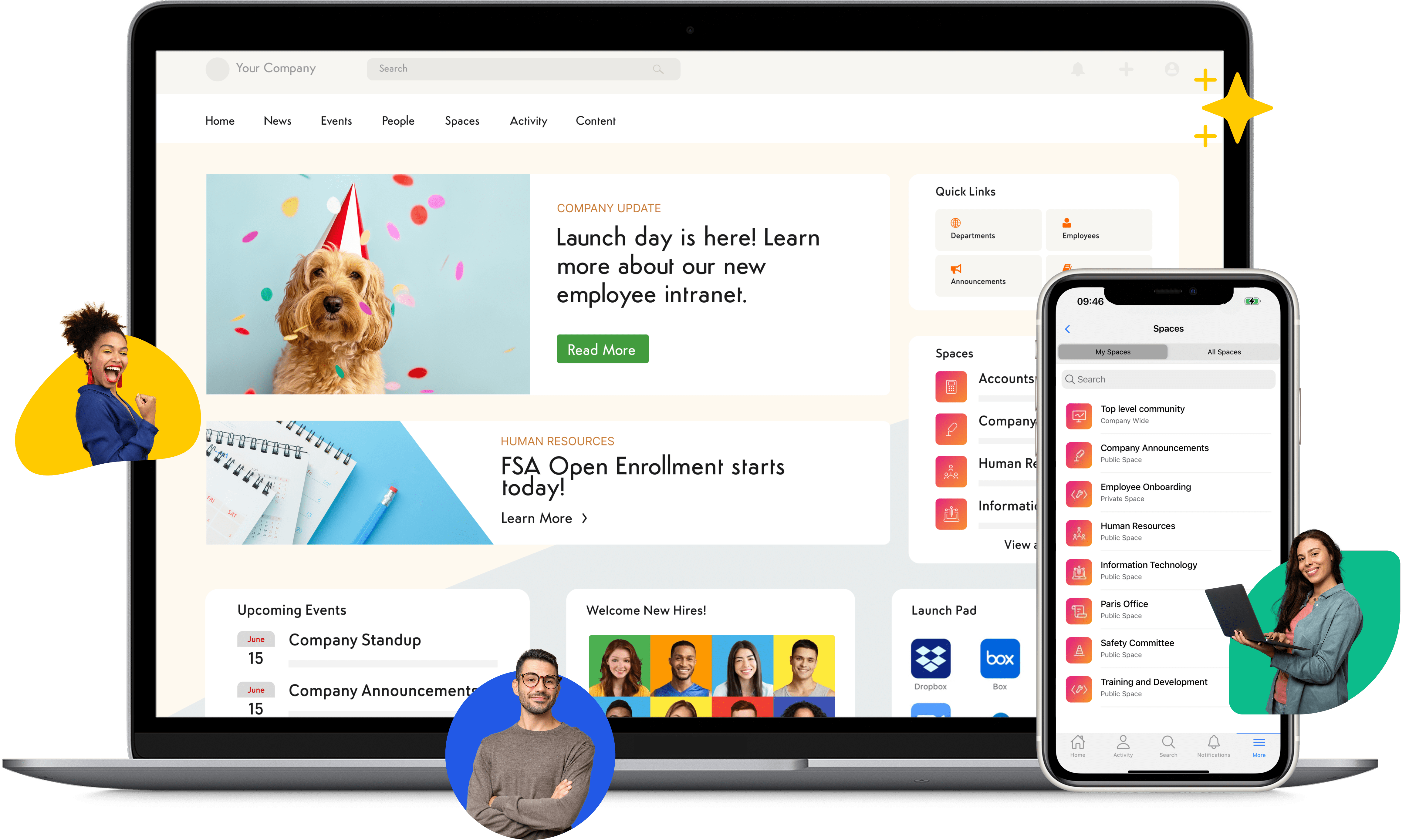
Axero approaches digital adoption from a broader digital workplace perspective. Instead of treating adoption as a layer on top of software, Axero embeds guidance, knowledge, and communication into a centralized intranet experience. This helps employees learn tools in context while staying aligned with company processes and expectations.
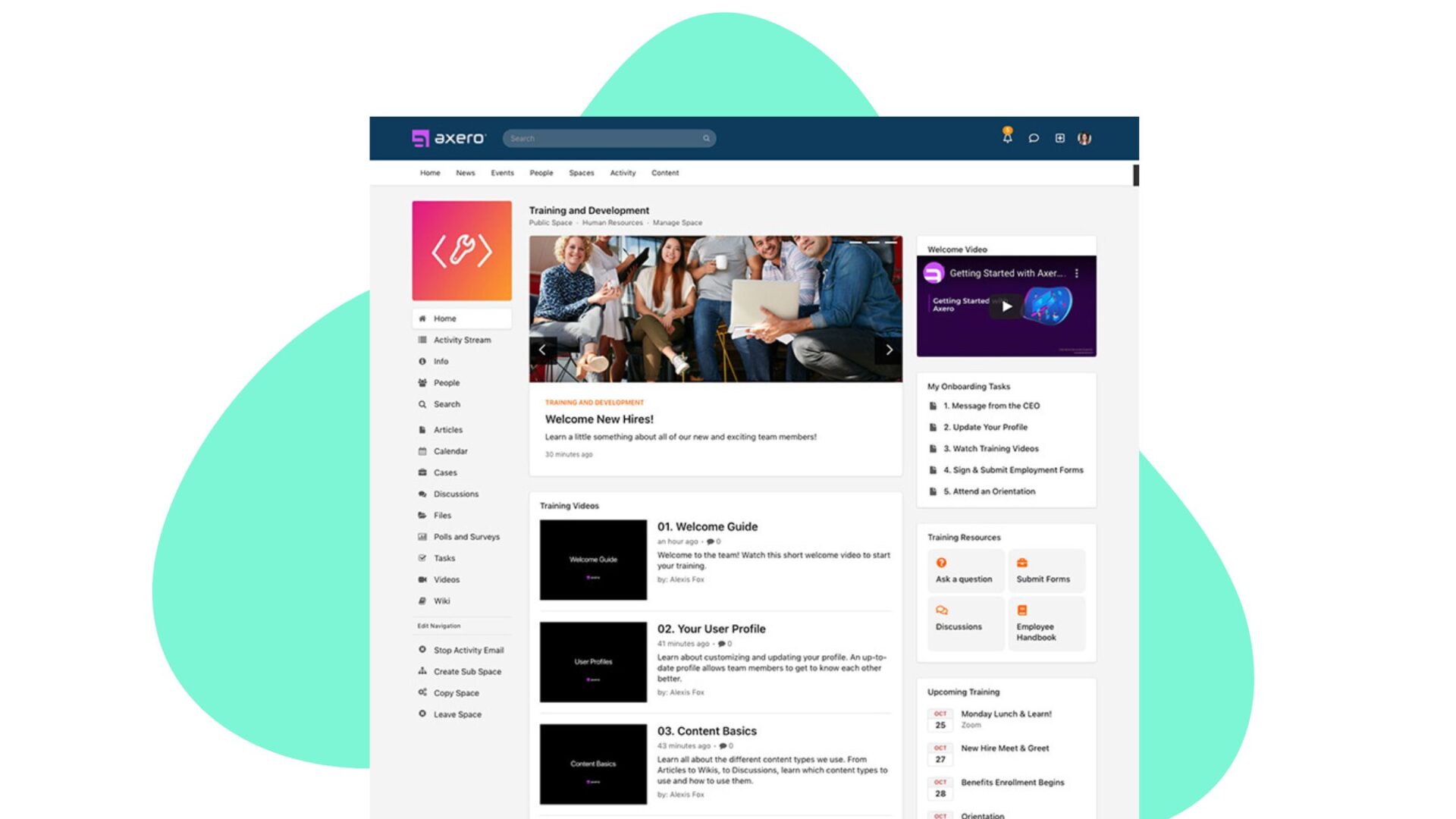
With Axero, organizations can create structured onboarding journeys, embed how-to content directly into workflows, and surface relevant resources based on role or department. Employees know where to go for answers, and leaders gain confidence that information stays consistent and current.
Axero also supports change management beyond single applications. New tools, updated processes, and company-wide initiatives can all be communicated, reinforced, and supported through one platform. This reduces fragmentation and improves long-term adoption. Because Axero acts as a single source of truth, digital adoption becomes part of everyday work, not a separate initiative. This makes it easier to drive engagement, reduce support tickets, and improve productivity across teams.
Key features of Axero
- Centralized intranet hub: Consolidates guidance, resources, and communications in one trusted location.
- Role-based content delivery: Ensures employees see relevant training and updates based on their responsibilities.
- Embedded knowledge and workflows: Supports adoption directly within daily processes, not disconnected tools.
Best for: Organizations that want to combine digital adoption with a full intranet and employee experience platform.

2. WalkMe
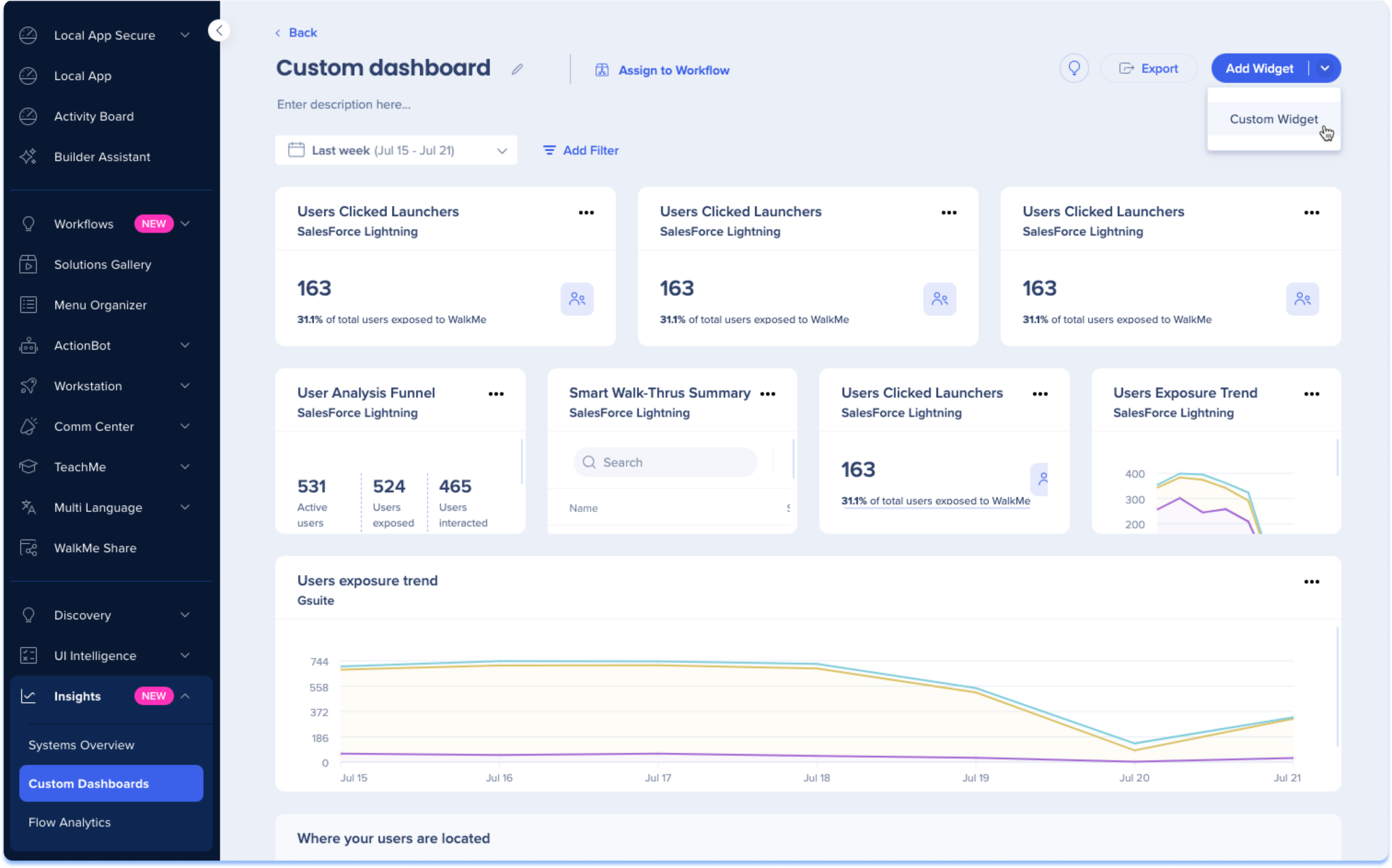
WalkMe is one of the most established digital adoption platforms on the market. It focuses heavily on in-app guidance, automation, and user behavior analytics across enterprise systems.
The platform allows organizations to create step-by-step walkthroughs, smart tips, and automated flows that guide users through complex processes. These experiences adapt based on user behavior, helping reduce errors and incomplete tasks.
WalkMe also offers strong analytics capabilities. Teams can track usage patterns, identify friction points, and measure the impact of guidance on task completion and efficiency. This data supports continuous improvement and large-scale change initiatives.
Due to its depth, WalkMe often requires dedicated ownership and setup. It fits best in environments with complex systems and mature digital transformation programs.
Key features of WalkMe
- Advanced in-app walkthroughs: Guides users through multi-step processes in real time.
- Behavior-based automation: Triggers guidance based on user actions and conditions.
- Enterprise-grade analytics: Provides deep insights into adoption and process performance.
Best for: Large enterprises managing complex software environments and structured change programs.
3. Whatfix

Whatfix delivers contextual learning and performance support across web, desktop, and mobile applications. It focuses on helping employees complete tasks correctly while reducing dependency on formal training.
The platform enables teams to build interactive walkthroughs, tooltips, and self-help widgets without coding. Content can be updated quickly, which is useful in fast-changing environments.
Whatfix also includes analytics to identify drop-off points and content effectiveness. These insights help organizations improve both software usability and training strategies over time.
Whatfix supports multiple deployment models and integrates with common enterprise tools, making it flexible for global organizations with diverse systems.
Key features of Whatfix
- No-code content creation: Allows business teams to build and maintain guidance easily.
- Multi-platform support: Works across web, desktop, and mobile applications.
- User behavior analytics: Highlights adoption trends and areas for improvement.
Best for: Organizations that need flexible, scalable guidance across multiple applications.
4. Pendo
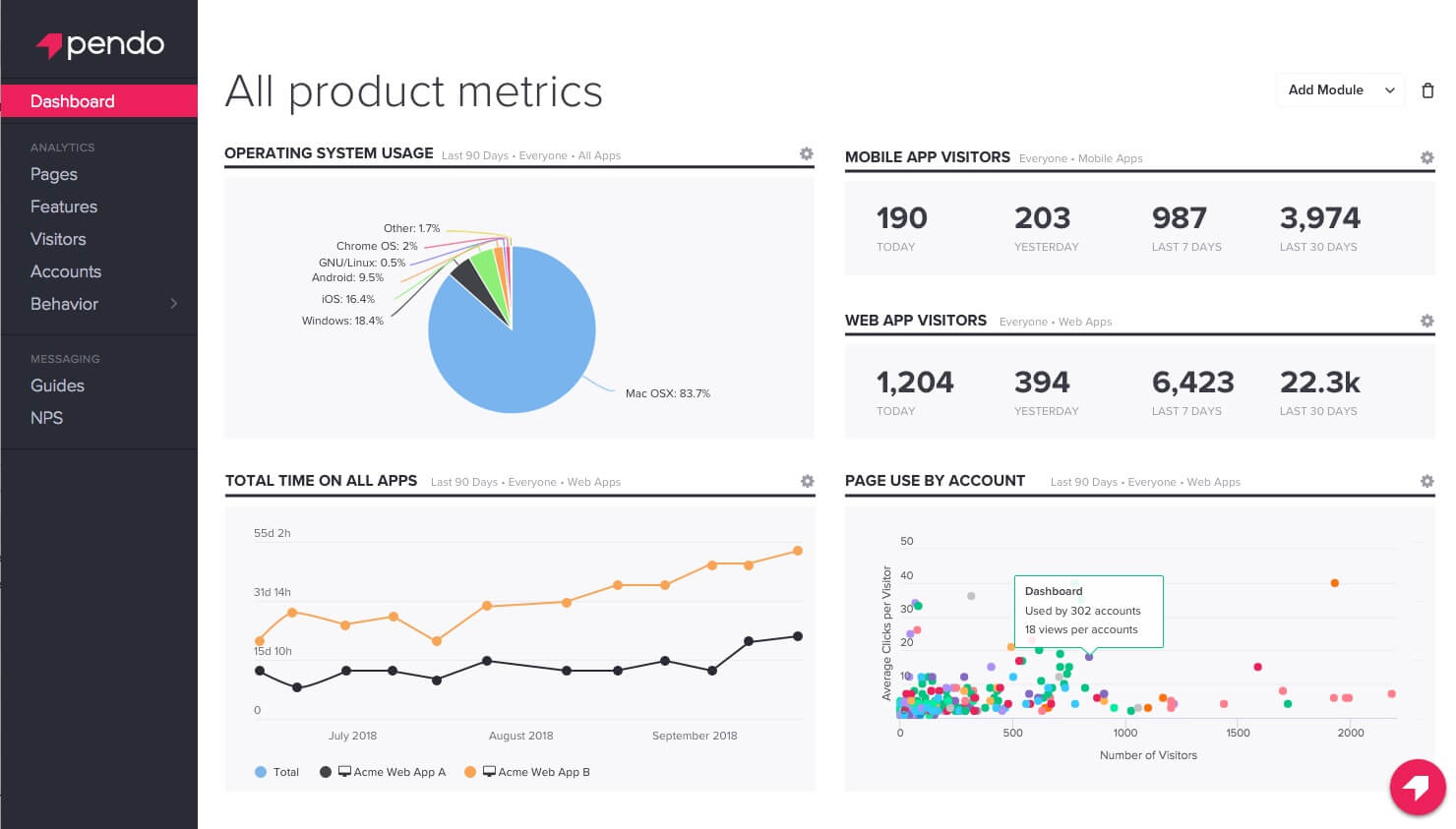
Pendo blends product analytics with digital adoption capabilities. It is commonly used by software teams but also supports internal application adoption.
The platform provides in-app guides, announcements, and onboarding flows while capturing detailed usage data. Teams can understand how features get used and where users disengage.
Pendo’s strength lies in its analytics. Organizations gain visibility into user behavior without relying solely on surveys or feedback. This data can inform training priorities and product decisions.
While powerful, Pendo works best when adoption efforts align closely with analytics-driven decision-making. It may require coordination between IT, product, and operations teams.
Key features of Pendo
- In-app onboarding and messaging: Supports announcements and guided experiences.
- Product usage analytics: Tracks feature adoption and engagement patterns.
- Feedback collection tools: Captures user sentiment within applications.
Best for: Teams that want to combine adoption efforts with detailed usage analytics.
5. Appcues

Appcues focuses on creating in-app experiences that guide users through key actions and workflows. It is commonly used for onboarding and feature adoption, helping users understand how to use software without leaving the application.
The platform allows teams to build modals, banners, checklists, and walkthroughs using a visual editor. This makes it accessible for non-technical teams who want to improve adoption without relying on developers.
Appcues includes targeting and segmentation features, so guidance can be personalized based on role, behavior, or lifecycle stage. This helps reduce noise and ensures employees see relevant prompts only when they matter.
While Appcues is strong for onboarding and announcements, it works best as part of a broader adoption strategy supported by centralized knowledge and communication tools like an intranet.
Key features of Appcues
- Visual flow builder: Creates onboarding and guidance without coding.
- Targeted user segmentation: Delivers personalized experiences based on behavior.
- In-app announcements: Communicates updates and changes directly in tools.
Best for: Teams focused on onboarding and feature discovery within specific applications.
6. Userlane

Userlane positions itself as a real-time guidance platform designed to support users as they complete tasks. It emphasizes automation and contextual assistance within enterprise applications.
The platform overlays guidance directly onto software interfaces, guiding users step by step through processes. This approach helps reduce errors and improves task completion rates, especially for complex systems.
Userlane also offers analytics to track usage, completion times, and friction points. These insights help organizations identify training gaps and improve workflows.
Because Userlane operates directly within applications, it pairs well with a centralized intranet where employees can access deeper resources, updates, and governance documentation.
Key features of Userlane
- Step-by-step task guidance: Supports users through complex workflows.
- Process analytics: Tracks efficiency and completion performance.
- Automation support: Reduces manual effort and user errors.
Best for: Organizations with complex internal systems and structured processes.
7. Chameleon
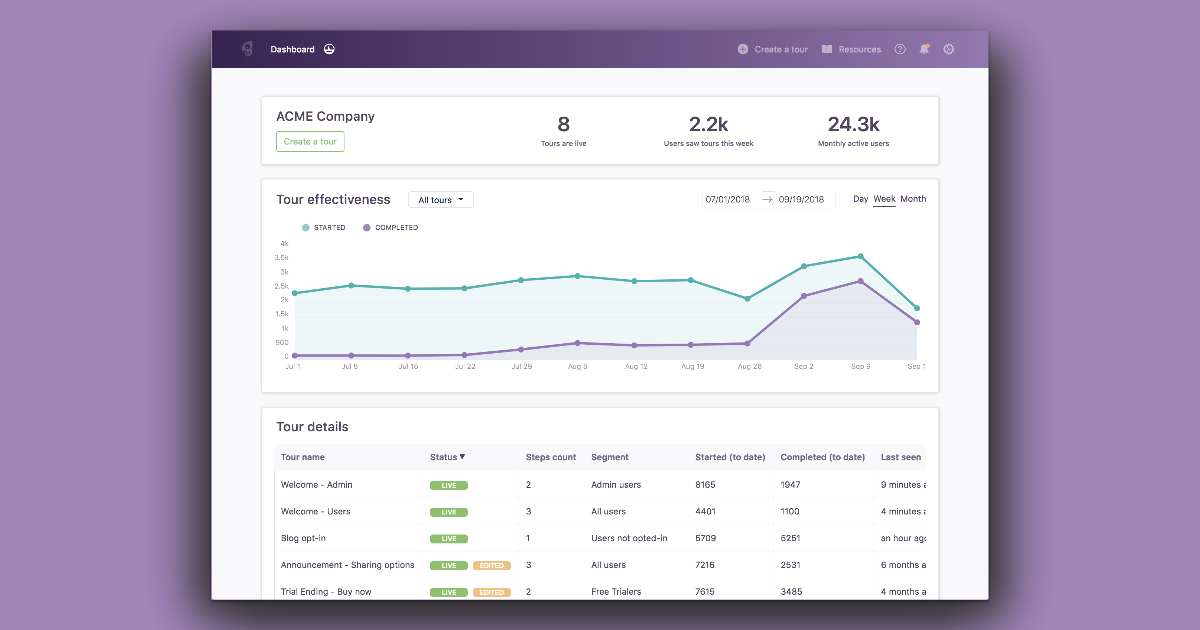
Chameleon focuses on building in-app experiences that support adoption through subtle, targeted guidance. It emphasizes user interface patterns that feel integrated rather than intrusive.
Teams can create tooltips, banners, and walkthroughs using a no-code editor. Chameleon also supports segmentation, allowing guidance to appear based on user role or behavior.
The platform includes basic analytics to measure engagement with guidance elements. These insights help teams refine messaging and timing.
Chameleon works best when adoption efforts focus on usability and incremental improvement. It benefits from being paired with a broader digital workplace that provides consistent learning and communication outside the application.
Key features of Chameleon
- UI-native guidance patterns: Delivers help without disrupting workflows.
- Audience targeting: Customizes experiences for specific user groups.
- Engagement tracking: Measures interaction with guidance elements.
Best for: Teams prioritizing subtle guidance and user experience consistency.
8. Gainsight PX
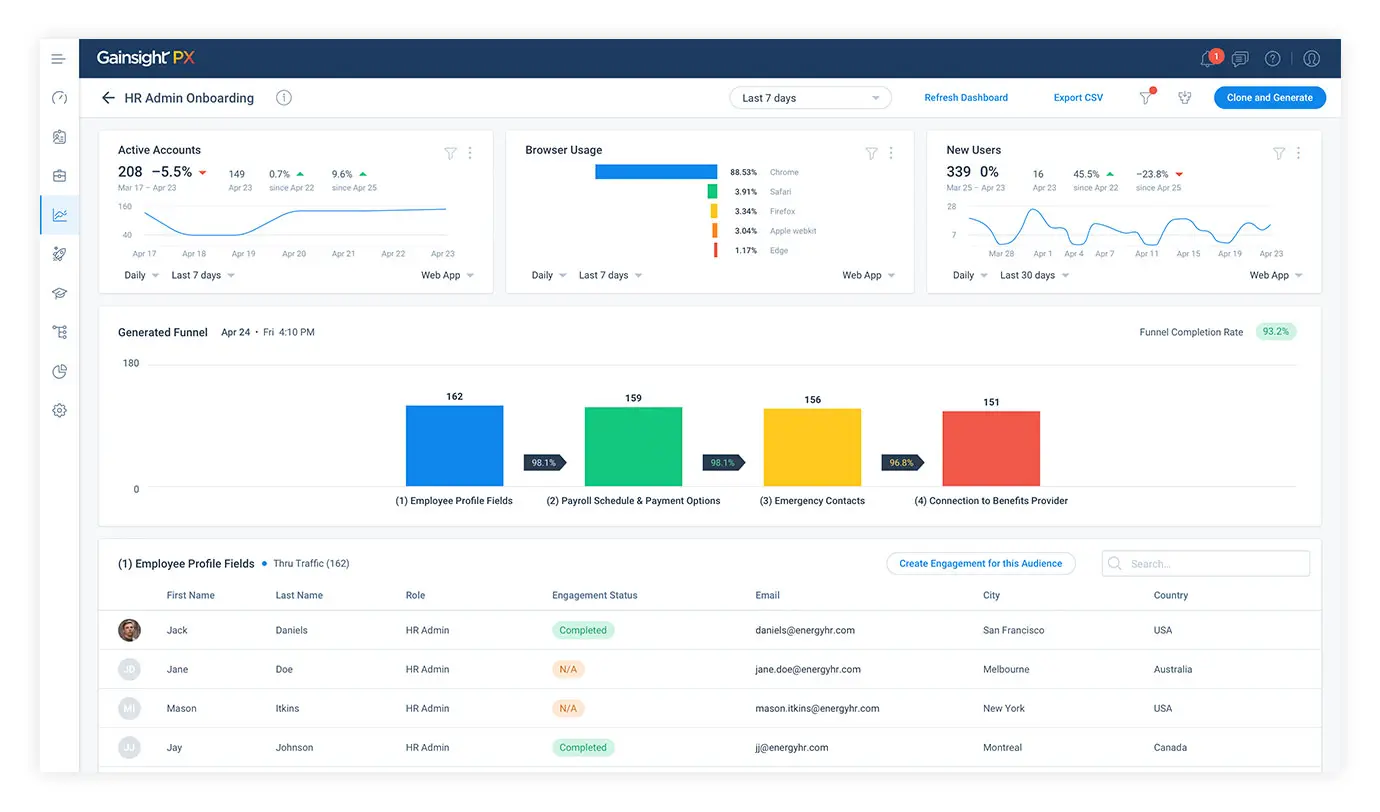
Gainsight PX combines product analytics with in-app engagement tools. It is designed to help organizations understand how users interact with software and guide them toward desired behaviors.
The platform provides walkthroughs, in-app messages, and feature prompts tied directly to usage data. This allows teams to respond to real behavior rather than assumptions.
Gainsight PX offers strong reporting capabilities, making it easier to track adoption trends and measure the impact of guidance. These insights support continuous optimization.
As with other analytics-driven platforms, Gainsight PX is most effective when paired with a centralized hub where training, updates, and governance live alongside adoption insights.
Key features of Gainsight PX
- Behavior-driven engagement: Triggers guidance based on real usage.
- Product analytics: Tracks feature adoption and trends.
- In-app messaging: Reinforces best practices and updates.
Best for: Organizations that want to tie digital adoption closely to analytics.
9. SAP Enable Now
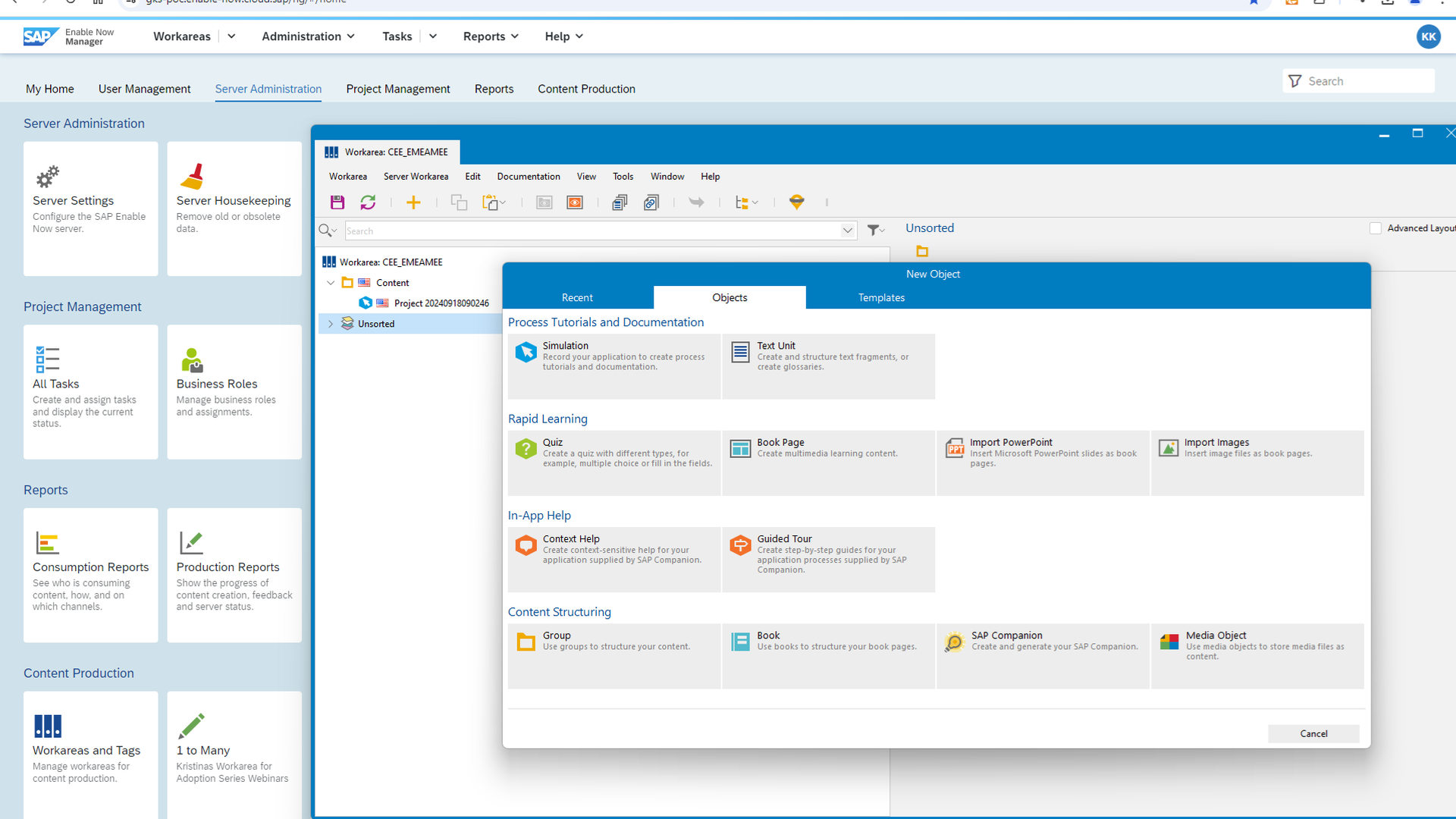
SAP Enable Now is a digital adoption and learning platform designed for enterprise environments, particularly those running SAP systems. It focuses on performance support, training content, and process guidance embedded directly into applications.
The platform allows organizations to create simulations, walkthroughs, and contextual help that guide users through complex workflows. This is especially useful for regulated environments where accuracy and consistency matter.
SAP Enable Now also supports formal learning content, documentation, and assessments. This makes it suitable for organizations that need to balance real-time guidance with structured training programs.
Because of its enterprise focus, SAP Enable Now works best alongside a centralized intranet that provides governance, communications, and cross-system visibility for employees.
Key features of SAP Enable Now
- Embedded performance support: Guides users directly within SAP applications.
- Simulation-based training: Allows safe practice without affecting live systems.
- Enterprise governance controls: Supports compliance and standardization.
Best for: SAP-centric organizations with complex, regulated processes.
10. Inline Manual

Inline Manual provides contextual help and onboarding directly inside web applications. It focuses on simplifying training and reducing reliance on external documentation.
The platform enables teams to create tooltips, guides, and self-help elements using a no-code editor. Content appears contextually, helping users understand features as they work.
Inline Manual includes analytics to track usage and engagement with guidance content. These insights help teams refine onboarding flows and identify friction points.
While effective for in-app guidance, Inline Manual benefits from integration with a broader intranet where deeper documentation, updates, and company-wide resources live.
Key features of Inline Manual
- Contextual in-app help: Supports learning in the flow of work.
- No-code editor: Enables fast content creation and updates.
- Engagement analytics: Measures effectiveness of guidance.
Best for: Teams seeking lightweight, in-app onboarding support.
11. Apty

Apty focuses on driving software adoption and governance across enterprise applications. It emphasizes task completion, process standardization, and user accountability.
The platform overlays guidance onto applications to help users follow defined workflows. This reduces errors and improves consistency across teams.
Apty also offers analytics and alerts to monitor adoption and compliance. Leaders gain visibility into how tools are used and where intervention is needed.
Apty works well in environments where process adherence is critical. Pairing it with an intranet like Axero ensures guidance aligns with documented policies and communication.
Key features of Apty
- Process-driven guidance: Reinforces standardized workflows.
- Adoption and compliance analytics: Tracks usage and deviations.
- Enterprise controls: Supports governance at scale.
Best for: Organizations focused on compliance and process consistency.
Choosing the right digital adoption platform for long-term success
Digital adoption platforms help ensure employees actually use the tools your organization invests in. The right choice depends on your systems, your culture, and how you support change.
Platforms that focus only on in-app prompts solve part of the problem. Long-term adoption requires consistent communication, accessible knowledge, and a trusted place for employees to learn and stay aligned.
This is where Axero stands apart. By combining digital adoption support with a centralized intranet, Axero gives organizations one platform to guide employees, reinforce processes, and communicate change. Adoption becomes part of everyday work, not a separate initiative.
If you want to improve software adoption while strengthening engagement and alignment, we can help. Book a demo with Axero and see how a unified digital workplace supports lasting change.









 info@axerosolutions.com
 1-855-AXERO-55